Contributor Guide
As of August 16th, 2025
How to commit
List of good resources to find out what to do:
How can I contribute?
- Clone the repo you want to commit to
- Create a new branch off of main
- Create the changes you want to add
- Create a pull request describing what you fixed or what you're adding, for simple bug reports you can just say “Fixes
” - Wait for approval
- Make changes if needed
- Boom dopamine
The pY Contributor Feng Shui
You should aim to make your code reusable, extensible.
Docs are located here
If you're adding new functions make sure to document them using luadoc format. You should also go into pybugreports and edit the src folder files and add a new page or edit an existing page to add your new contributions. While editting / creating this new file ensure to change the date at the top saying As of September 32 1685 to the current date as of editting, do not worry about timezones. Try and make your new contributions to the docs fit the style as the content in the file.
General Layout
We have 2 branches for different updates: Master or Main and Breaking Changes
- Main or Master is used for bug fixes, general fixes, or non-removing enhancements.
- Breaking changes is used for breaking changes like changing the output of a recipe to have a new byproduct.
The codebase will look something like this typically
pytesting
├── control.lua
├── data.lua
├── scripts
│      └── example.lua
└── prototypes
         ├── buildings
         │      └── example-building.lua
         ├── items
         │      └── items.lua
         ├── recipes
         │      └── recipes.lua
         └── technologies
                  └── exmple-technology.lua
Helpful scripts
Platform Agnostic
Clones all of the py repos
git clone https://github.com/pyanodon/pyalienlife.git
git clone https://github.com/pyanodon/pypostprocessing.git
git clone https://github.com/pyanodon/pycoalprocessing.git
git clone https://github.com/pyanodon/pyfusionenergy.git
git clone https://github.com/pyanodon/pyhightech.git
git clone https://github.com/pyanodon/pyindustry.git
git clone https://github.com/pyanodon/pyrawores.git
git clone https://github.com/pyanodon/pypetroleumhandling.git
git clone https://github.com/pyanodon/pyalternativeenergy.git
Linux
Simple script to reset all branches to the main/master branch and pull in a directory:
cd "$(dirname "$0")"

for folder in py*/; do
    if [ -d "$folder" ]; then
        cd "$folder" || continue

        # Get the default remote branch (e.g., origin/main or origin/master)
        default_branch=$(git symbolic-ref refs/remotes/origin/HEAD --short | sed 's|origin/||')

        git checkout "$default_branch"
        git pull --rebase

        cd ..
    fi
done
Updates everything from the current branch it's on:
# Exit on error
set -e

# Loop through each directory starting with "py" that is a git repo
for dir in py*/; do
    if [ -d "$dir/.git" ]; then
        echo "Processing repository: $dir"
        cd "$dir"

        # Pull the latest changes from the remote
        echo "Updating repository..."
        git pull

        # If the ignore revs file exists, configure blame to use it
        if [ -f ".git-blame-ignore-revs" ]; then
            echo "Configuring git to ignore revs in .git-blame-ignore-revs"
            git config blame.ignoreRevsFile .git-blame-ignore-revs
        else
            echo "No .git-blame-ignore-revs file found in $dir"
        fi

        cd ..
    fi
done

echo "All repositories processed."
Lists all git branches:
find . -type d -name ".git" | while read -r gitdir; do
    repo=$(dirname "$gitdir")
    branch=$(git -C "$repo" rev-parse --abbrev-ref HEAD 2>/dev/null)
    echo "$repo: $branch"
done
Frequently Asked Questions
Where are pypostprocessing functions located at?
pypostprocessing/lib for in-general stuff
pypostprocessing/lib/metas for prototyping functions
pypostprocessing/lib/events for control event functions
Internal APIs
Internal APIs are things like pypostprocessing functions.
PyPostProcessing Data Stage
General functions used in Data Stage created by pypostprocessing.
Items
As of August 16th, 2025
---@class data.ItemPrototype
---@field public add_flag fun(self: data.ItemPrototype, flag: string): data.ItemPrototype
---@field public remove_flag fun(self: data.ItemPrototype, flag: string): data.ItemPrototype
---@field public has_flag fun(self: data.ItemPrototype, flag: string): boolean
---@field public spoil fun(self: data.ItemPrototype, spoil_result: (string | table), spoil_ticks: number): data.ItemPrototype
Example Usage
ITEM function can be used like this to create a new item:
ITEM {
  type = "item",
  name = "example-item",
  icon = "__pyexample__/graphics/icons/example.png",
  icon_size = 64,
  stack_size = 50
}
It can also be used like this to get an existing item:
ITEM("example-item")
Item Functions
Spoil
@field public spoil fun(self: data.ItemPrototype, spoil_result: (string | table), spoil_ticks: number): data.ItemPrototype
local spoil_result = "iron-plate"
local spoil_ticks = 5 * 60 -- 5 Seconds
ITEM("example-item"):spoil(spoil_result, spoil_ticks)
Add Flag
@field public add_flag fun(self: data.ItemPrototype, flag: string): data.ItemPrototype
local flag = "placeable-by-player"
ITEM("example-item"):add_flag(flag)
Remove Flag
@field public remove_flag fun(self: data.ItemPrototype, flag: string): data.ItemPrototype
local flag = "placeable-by-player"
ITEM("example-item"):remove_flag(flag)
Has Flag
@field public has_flag fun(self: data.ItemPrototype, flag: string): boolean
local flag = "placeable-by-player"
local has_flag = ITEM("example-item"):has_flag(flag)
Entity
As of August 16th, 2025
---@class data.EntityPrototype
---@field public standardize fun(self: data.EntityPrototype): data.EntityPrototype
---@field public add_flag fun(self: data.EntityPrototype, flag: string): data.EntityPrototype
---@field public remove_flag fun(self: data.EntityPrototype, flag: string): data.EntityPrototype
---@field public has_flag fun(self: data.EntityPrototype, flag: string): boolean
Example Usage
ENTITY function can be used like this to create a new entity:
ENTITY {
  type = "assembling-machine",
  name = "example-entity",
  icon = "__pyexample__/graphics/icons/example.png",
  icon_size = 64,
  ...
}
It can also be used to get an existing entity:
ENTITY("example-entity")
Entity Functions
Add Flag
@field public add_flag fun(self: data.EntityPrototype, flag: string): data.EntityPrototype
local flag = "placeable-by-player"
ENTITY("example-item"):add_flag(flag)
Remove Flag
@field public remove_flag fun(self: data.EntityPrototype, flag: string): data.EntityPrototype
local flag = "placeable-by-player"
ENTITY("example-item"):remove_flag(flag)
Has Flag
@field public has_flag fun(self: data.EntityPrototype, flag: string): boolean
local flag = "placeable-by-player"
local has_flag = ENTITY("example-item"):has_flag(flag)
Fluid
As of August 16th, 2025
FLUID can be used like so:
FLUID{
  type = "fluid",
  name = "example-fluid"
}
You can also use it to get existing fluids
FLUID("example-fluid")
Recipe
As of August 16th, 2025
---@class data.RecipePrototype
---@field public standardize fun(self: data.RecipePrototype): data.RecipePrototype
---@field public add_unlock fun(self: data.RecipePrototype, technology_name: string | string[]): data.RecipePrototype
---@field public remove_unlock fun(self: data.RecipePrototype, technology_name: string | string[]): data.RecipePrototype
---@field public replace_unlock fun(self: data.RecipePrototype, technology_old: string | string[], technology_new: string | string[]): data.RecipePrototype
---@field public replace_ingredient fun(self: data.RecipePrototype, old_ingredient: string, new_ingredient: string | data.IngredientPrototype, new_amount: integer?): data.RecipePrototype
---@field public add_ingredient fun(self: data.RecipePrototype, ingredient: data.IngredientPrototype): data.RecipePrototype
---@field public remove_ingredient fun(self: data.RecipePrototype, ingredient_name: string): data.RecipePrototype, integer
---@field public replace_result fun(self: data.RecipePrototype, old_result: string, new_result: string | data.ProductPrototype, new_amount: integer?): data.RecipePrototype
---@field public add_result fun(self: data.RecipePrototype, result: string | data.ProductPrototype): data.RecipePrototype
---@field public remove_result fun(self: data.RecipePrototype, result_name: string): data.RecipePrototype
---@field public clear_ingredients fun(self: data.RecipePrototype): data.RecipePrototype
---@field public multiply_result_amount fun(self: data.RecipePrototype, result_name: string, percent: number): data.RecipePrototype
---@field public multiply_ingredient_amount fun(self: data.RecipePrototype, ingredient_name: string, percent: number): data.RecipePrototype
---@field public add_result_amount fun(self: data.RecipePrototype, result_name: string, increase: number): data.RecipePrototype
---@field public add_ingredient_amount fun(self: data.RecipePrototype, ingredient_name: string, increase: number): data.RecipePrototype
---@field public set_result_amount fun(self: data.RecipePrototype, result_name: string, amount: number): data.RecipePrototype
---@field public set_ingredient_amount fun(self: data.RecipePrototype, ingredient_name: string, amount: number): data.RecipePrototype
---@field public get_main_product fun(self: data.RecipePrototype, allow_multi_product: bool?): LuaItemPrototype?|LuaFluidPrototype?
---@field public get_icons fun(self: data.RecipePrototype): data.IconData
Example Usage
You can create a new recipe like so:
RECIPE {
  type = "recipe",
  name = "example-recipe",
  ingredients = {},
  results = {{type = "item", name = "example-item", amount = 1}}
}
You can also get existing recipes
RECIPE("example-recipe")
Recipe Functions
Add Unlock
@field public add_unlock fun(self: data.RecipePrototype, technology_name: string | string[]): data.RecipePrototype
local technology_name = "example-tech"
RECIPE("example-recipe"):add_unlock(technology_name)
local technologies = {"example-tech", "example-tech-2"}
RECIPE("example-recipe"):add_unlock{technologies}
Remove Unlock
@field public remove_unlock fun(self: data.RecipePrototype, technology_name: string | string[]): data.RecipePrototype
local technology_name = "example-tech"
RECIPE("example-recipe"):remove_unlock(technology_name)
local technologies = {"example-tech", "example-tech-2"}
RECIPE("example-recipe"):remove_unlock{technologies}
Replace Unlock
@field public replace_unlock fun(self: data.RecipePrototype, technology_old: string | string[], technology_new: string | string[]): data.RecipePrototype
Equivalent to :remove_unlock(from):add_unlock(to)
local from = "example-tech"
local to = "ultra-tech"
RECIPE("example-recipe"):replace_unlock(from, to)
local from = {"example-tech", "example-tech-2"}
local to = {"ultra-tech", "ultra-tech-2"}
RECIPE("example-recipe"):replace_unlock(from, to)
Add Ingredient
@field public add_ingredient fun(self: data.RecipePrototype, ingredient: data.IngredientPrototype): data.RecipePrototype
RECIPE("example-recipe"):add_ingredient{
  type = "item",
  name = "iron-plate",
  amount = 5
}
Remove Ingredient
@field public remove_ingredient fun(self: data.RecipePrototype, ingredient_name: string): data.RecipePrototype, integer
RECIPE("example-recipe"):remove_ingredient("iron-plate")
Replace Ingredient
@field public replace_ingredient fun(self: data.RecipePrototype, old_ingredient: string, new_ingredient: string | data.IngredientPrototype, new_amount: integer?): data.RecipePrototype
local from = "iron-plate"
local to = "copper-plate"
RECIPE("example-recipe"):replace_ingredient(from, to)
local from = "iron-plate"
local to = {
  type = "item",
  name = "copper-plate",
  amount = 5
}
RECIPE("example-recipe"):replace_ingredient(from, to)
local from = "iron-plate"
local to = "copper-plate"
local amount = 10
RECIPE("example-recipe"):replace_ingredient(from, to, amount)
Clear Ingredients
@field public clear_ingredients fun(self: data.RecipePrototype): data.RecipePrototype
RECIPE("example-recipe"):clear_ingredients()
Add Result
@field public add_result fun(self: data.RecipePrototype, result: string | data.ProductPrototype): data.RecipePrototype
RECIPE("example-recipe"):add_result{
  type = "item",
  name = "iron-plate",
  amount = 5
}
Remove Result
@field public remove_result fun(self: data.RecipePrototype, result_name: string): data.RecipePrototype
RECIPE("example-recipe"):remove_result("iron-plate")
Replace Result
@field public replace_result fun(self: data.RecipePrototype, old_result: string, new_result: string | data.ProductPrototype, new_amount: integer?): data.RecipePrototype
local from = "iron-plate"
local to = "copper-plate"
RECIPE("example-recipe"):replace_result(from, to)
local from = "iron-plate"
local to = {
  type = "item",
  name = "copper-plate",
  amount = 5
}
RECIPE("example-recipe"):replace_result(from, to)
local from = "iron-plate"
local to = "copper-plate"
local amount = 10
RECIPE("example-recipe"):replace_result(from, to, amount)
Multiply Result Amount
@field public multiply_result_amount fun(self: data.RecipePrototype, result_name: string, percent: number): data.RecipePrototype
local name = "iron-plate"
local percent = 1.5
RECIPE("example-recipe"):multiply_result_amount(name, percent)
Multiply Ingredient Amount
@field public multiply_ingredient_amount fun(self: data.RecipePrototype, ingredient_name: string, percent: number): data.RecipePrototype
local name = "iron-plate"
local percent = 1.5
RECIPE("example-recipe"):multiply_ingredient_amount(name, percent)
Add Result Amount
@field public add_result_amount fun(self: data.RecipePrototype, result_name: string, increase: number): data.RecipePrototype
local name = "iron-plate"
local increase = 10
RECIPE("example-recipe"):add_result_amount(name, increase)
Add Ingredient Amount
@field public add_ingredient_amount fun(self: data.RecipePrototype, ingredient_name: string, increase: number): data.RecipePrototype
local name = "iron-plate"
local increase = 10
RECIPE("example-recipe"):add_ingredient_amount(name, increase)
Set Result Amount
@field public set_result_amount fun(self: data.RecipePrototype, result_name: string, amount: number): data.RecipePrototype
local name = "iron-plate"
local amount = 10
RECIPE("example-recipe"):set_result_amount(name, amount)
Set Ingredient Amount
@field public set_ingredient_amount fun(self: data.RecipePrototype, ingredient_name: string, amount: number): data.RecipePrototype
local name = "iron-plate"
local amount = 10
RECIPE("example-recipe"):set_ingredient_amount(name, amount)
Get Main Product
@field public get_main_product fun(self: data.RecipePrototype, allow_multi_product: bool?): LuaItemPrototype?|LuaFluidPrototype?
local main_product = RECIPE("example-recipe"):get_main_product()
local main_products = RECIPE("example-recipe"):get_main_product(true)
Get Icons
@field public get_icons fun(self: data.RecipePrototype): data.IconData
local icons = RECIPE("example-recipe"):get_icons()
Technology
WIP
Example Usage
Technology Functions
Tile
WIP
Example Usage
Tile Functions
Compound Entities
As of August 21st, 2025
Compound entities are entities made up of multiple entities. For example vatbrains are just assembling-machines with a beacon hidden inside them.
These are typically a multi-step process of tracking these manually with storage variable and when things have been placed down and integrating GUI. This is to be put simply, annoying. So I (Lemon) did what any sane programmer would do and just made a special API for it.
How to use?
The meat and potatoes of this api is that you can do this very easily just at data stage.
Here's a minimal example of how
local parent = "assembling-machine"
local child = "beacon"
py.compound_attach_entity_to(parent, child, {})
And then in the control stage
require "__pypostprocessing__.lib" -- If you don't have this somewhere already

-- This should be after every other compound entity function as well
py.register_compound_entities()
py.finalize_events() -- If you don't have this either already
That's it, you have an assembling machine with a beacon now.
Wait but what about that empty table at the end?
Example
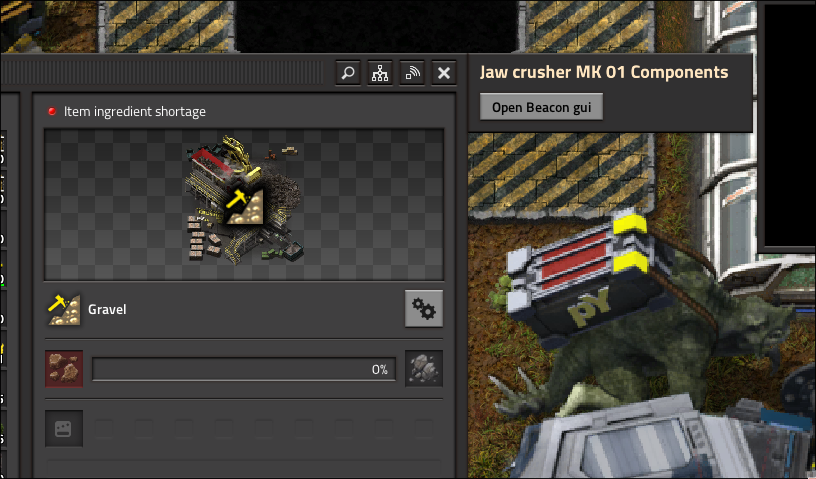
py.compound_attach_entity_to("jaw-crusher", "beacon", {
    enable_gui = true
})
This is what this looks like:
API Specification
How this works internally is that compound entity attachments get attached in data stage then smuggled using mod_data over to control stage.
In control stage we then register a few events to detect when things are placed or picked up and other functions.
Data
-- Attachs an entity to another entity with additional properties
-- @param parent string
-- @param child string
--
-- @param additional AdditionalParams
-- @class AdditionalParams
-- @field enable_gui bool Enables an entry in the gui of the parent
-- @field gui_title string The title of the parent gui
-- @field gui_function_name string The name of the register compound function that handles adding the button to the gui
-- @field gui_submenu_function string The fuction called when you hit the button itself
-- @field gui_caption string The text the button has
-- @field position_offset MapPosition https://lua-api.factorio.com/2.0.64/concepts/MapPosition.html
-- @field on_built string Name of compound_entity function to run when the entity is built
--
-- @see https://pyanodon.github.io/pybugreports/internal_apis/compound_entities.html
function py.compound_attach_entity_to(parent, child, additional)
    -- ...
end
Control
Register Compound Function
-- Registers a new compound function
-- @param name string Name of the function
-- @param func (GuiTitleFunction|GuiFunction|GuiSubmenuFunction|OnChildBuiltFunction)
--
-- @function GuiTitleFunction
-- @param entity LuaEntity parent entity
-- @return string Title
--
-- @function GuiFunction
-- @param event events.on_gui_opened Event data of when on_gui_opened is called
-- @param player LuaEntity the player who opened the GUI
-- @param gui_root LuaGuiElement The root of the preset GUI that you can add to
-- @param current_index number The index of the compound-entity child you are
-- @param gui_child LuaGuiElement The Button you are in the the gui_root
-- @return nil
--
-- @function GuiSubmenuFunction
-- @param entity Parent entity
-- @return (LuaGuiElement|LuaEntity) Anything that can be put in `player.opened`
--
-- @function OnChildBuiltFunction
-- @param child LuaEntity the child entity
-- @return nil
--
-- @see https://pyanodon.github.io/pybugreports/internal_apis/compound_entities.html
function py.register_compound_function(name, func)
    -- ...
end
Get Compound Function Name
-- Gets a registered compound_function from a name
-- @param name string The name of the function
function py.get_compound_function(name)
    -- ...
end
Get Compound Entity Children
-- Gets the compound entity's children from it's unit_number
-- @param unit_number number Unit number of the parent
function py.get_compound_entity_children(unit_number)
    -- ...
end
Get Compound Entity Parent
-- Gets the compound_entity parent from a child's unit_number
-- @param unit_number number Unit number of a child
function py.get_compound_entity_parent(unit_number)
    -- ...
end
Register Compound Entities
-- Register all compound_entities and create their events
function py.register_compound_entities()
    -- ...
end
Compound Attach Entity To
-- Adds a new child to a compound entity
-- Unsure about using this on non compound register parents, beware...
--
-- @param parent LuaEntity the parent compound entity
-- @param child string Name of the child
-- @param info Info
--
-- @class Info
-- @field enable_gui bool Not sure if it works but it's the same as the normal enable_gui property
-- @field possition_offset MapPosition https://lua-api.factorio.com/2.0.64/concepts/MapPosition.html
-- @field on_built string Name of compound_entity function to run when the entity is built
function py.compound_attach_entity_to(parent, child_name, info)
    -- ...
end
Delete Attached Entity by Filter Function
-- Deletes children from a parent by a filter function
-- Do not worry about validity it is checked internally
--
-- @param parent_unit_number number Unit number of the parent
-- @param filter_func fun(child: LuaEntity): bool Return true if delete
function py.delete_attached_entities_by_filter(parent_unit_number, filter_func)
PyStellarExpedition
Some of our internal APIs written done for developers, maybe you can gleam some useful information.
Rocket Modules
As of August 16th, 2025
Data
We define the equipment grid and the equipment category and the equipment grid proxy which is just an invisible car.
Then we can create our equipments with custom definition and with some prefilled in stuff to help. We store the equipment size and equipment name in a global variable for use later. Then we can define the equipment, each equipment is essentially a dummy. We define an item, a battery-equipment, and a recipe for each using the create_equipment function.
create_equipment looks like this:
--- @param definition ItemEquipmentRecipeHybrid
---
--- @class ItemEquipmentRecipeHybrid
--- @field name string
--- @field icon string|nil
--- @field icon_size number|nil Default size is 64
--- @field stack_size number|nil Default size is 10
--- @field shape table
--- @field hidden bool|nil
--- @field categories string[] The categories of the equipment
--- @field category string The recipe category
--- @field ingredients table|nil
--- @field results table|nil
local function create_equipment(definition)
  -- ...
end
definition is a mixture of item, equipment and recipe prototype. Example:
create_equipment{
  name = "lander",
  icon = "__pystellarexpeditiongraphics__/graphics/icons/lander-module.png",
  icon_size = 64,
  categories = {"rocket-silo-equipment"},
  stack_size = 1,
  shape = {
    width = 2,
    height = 2,
    type = "full"
  },
}
After we defined equipment we can now define the rocket part recipes for them using the local iterate_counts function. Which has this definition:
--- Creates a loop like this:
--- a: 1, b: 0, c: 0
--- a: 2, b: 0, c: 0
--- a: 3, b: 0, c: 0
--- a: 0, b: 1, c: 0
--- a: 1, b: 1, c: 0
--- Essentially binary counting
--- @param labels string[]
--- @param max number
--- @param print_func fun(row: table<string, number>) A table of labels and numbers
--- @param include_zero bool Whether to include zeros in the print_func row param
local function iterate_counts(labels, max, print_func, include_zero)
  -- ...
end
We use this function to create every possible rocket-part recipe and trim out some that can't exist using get_size
--- Gets the size of an equipment
--- @param name string
local function get_size(name)
  -- ...
end
This uses one of the globals we talked about earlier.
Problems with get_size and trimming
Currently we're doing it stupidly which means just not really trimming anything which leads with lots of impossible recipes. This isn't necessarily bad but still doesn't feel good.
I think implementing: https://en.wikipedia.org/wiki/Knuth's_Algorithm_X, Would be a great step in the right direction.
get_size also doesn't account for custom shapes which we will have in the future.
Control
WIP
PyAlienLife
Some APIs declared and used in pyalienlife.
Digosaurs
As of August 16th, 2025
You can add a new digosaur like this:
local name = "my-new-digosaur"
local bonus = 2
local proxy_name = "my-nex-digosaur-proxy"
remote.call("py_digosaurs", "new_digosaur", name, bonus, proxy_name)
You can also remove existing digosaurs like so:
remote.call("py_digosaurs", "remove_digosaur", "digosaurus")
T.U.R.D.
As of August 17th, 2025
remote.add_interface("pywiki_turd_page", {
    create_turd_page = create_turd_page,
    on_search = on_search,
    reapply_turd_bonuses = reapply_turd_bonuses,
    new_turd = new_turd,
    on_turd_built = on_turd_built
	get_machine_replacement = get_machine_replacement
})
New TURD
This function is the function called when clicking on the TURD select button.
It can be used like this to select an arbitrary TURD, if a TURD is already selected it will deselect it.
local fake_event = {
  skip_gui = true, -- Need this or it will error out because of gui events
  player = game.player,
  master_tech_name = master_tech_name, -- The technology that unlocks the turd
  sub_tech_name = sub_tech_name, -- The turd name
}

remote.call("pywiki_turd_page", "new_turd", fake_event)
end
get_machine_replacement
This function returns any applied machine replacement turds for the given entity
---@param force_index integer the force requesting this information
---@param entity_name string the entity get the replacement for
---@return string? replacement_entity the name of the entity that replaces the given entity
List of all TURD Techs and Subtechs
arqad-upgrade = {
	air-conditioner,
	cags,
	drone,
},
arthurian-upgrade = {
	abacus,
	heated-stone,
	cannibalism,
},
atomizer-upgrade = {
	sc-core,
	sub-atomic,
	d-core,
},
auog-upgrade = {
	sawdust,
	glowing-mushrooms,
	underground-chambers,
},
bhoddos-upgrade = {
	extra-drones,
	exoenzymes,
	gills,
},
biofactory-upgrade = {
	molecular-polyentomology,
	compusun,
	resonant,
},
bioprinting-upgrade = {
	high-viability,
	biomimetics,
	covalent,
},
bioreactor-upgrade = {
	aerators,
	baffles,
	jacket,
},
cadaveric-arum-upgrade = {
	acid-comtemplator,
	solar-scope,
	e-photo,
},
compost-upgrade = {
	constant,
	humus,
	worm-hotel,
},
cottongut-upgrade = {
	igm,
	ts,
	ud,
},
creature-chamber-upgrade = {
	respiratory,
	neural-fusion,
	cc,
},
cridren-upgrade = {
	sixth-layer,
	neural-cranio,
	mufflers,
},
data-array-upgrade = {
	booster,
	dbwt,
	solar-p,
},
dhilmos-upgrade = {
	cover,
	skimmer,
	double-intake,
},
dingrits-upgrade = {
	alpha,
	c-mutation,
	training,
},
fast-wood-forestry-upgrade = {
	dry-storage,
	selective-heads,
	self-generation,
},
fawogae-upgrade = {
	n2-ferti,
	acidosis,
	dry,
},
fish-upgrade = {
	a-select,
	temp-control,
	dosing-pump,
},
genlab-upgrade = {
	hsn,
	enn,
	dwx,
},
grod-upgrade = {
	hi-sprinkler,
	ground-irrigation,
	carbide-c,
},
guar-upgrade = {
	guarpulse,
	aquaguar,
	hh,
},
incubator-upgrade = {
	gs,
	zero,
	icd,
},
kicalk-upgrade = {
	wire-netting,
	extra-water,
	crop-rotation,
},
kmauts-upgrade = {
	sex-ratio,
	eye-out,
	moult-recycle,
},
korlex-upgrade = {
	multi-tit,
	high-pressure,
	nx-heat-pump,
},
moondrop-upgrade = {
	cu,
	moon,
	carbon-capture,
},
moss-upgrade = {
	spores,
	hd-moss,
	inbuilt-moss,
	remove-muddy-sludge,
},
mukmoux-upgrade = {
	zero-cross,
	bip,
	think-collar,
},
navens-upgrade = {
	cytotoxicity,
	pre-sterilization,
	lichen,
},
numal-upgrade = {
	d2o,
	nc,
	neutron-bombardment,
},
phadai-upgrade = {
	ethanol-boost,
	piezoelectric-floor,
	dubstep-track,
},
phagnot-upgrade = {
	leader,
	socialization,
	hr,
},
ralesia-upgrade = {
	improved-burst,
	sun-concentration,
	h2-recycle,
},
rennea-upgrade = {
	deadheading,
	alltime,
	aphid-cleaning,
},
research-upgrade = {
	unstable,
	ms,
	spg,
	mci,
},
sap-upgrade = {
	inoculator,
	patch,
	bark,
},
schrodinger-antelope-upgrade = {
	pentadimensional,
	existential-hazard,
	higgs-field,
},
scrondrix-upgrade = {
	boronb,
	hspa,
	neuron,
},
seaweed-upgrade = {
	improved-pathfinding,
	precise-cutting,
	recirculation-pump,
},
simik-digestion-mk01 = {
	simik-iron,
	simik-copper,
	simik-quartz,
},
simik-digestion-mk02 = {
	simik-coal,
	simik-tin,
	simik-aluminium,
},
simik-digestion-mk03 = {
	simik-boron,
	simik-chromium,
	simik-molybdenum,
},
simik-digestion-mk04 = {
	simik-zinc,
	simik-nickel,
	simik-lead,
},
simik-digestion-mk05 = {
	simik-titanium,
	simik-niobium,
	simik-nexelit,
},
simik-digestion-mk06 = {
	simik-silver,
	simik-gold,
	simik-uranium,
},
slaughterhouse-upgrade = {
	laser-cutting,
	mercy-killing,
	lard-machine,
},
sponge-upgrade = {
	flagellum,
	fragmentation,
	bacterial,
},
trits-upgrade = {
	mgo,
	dc,
	nexelit-axis,
},
tuuphra-upgrade = {
	fi,
	fungicide,
	tr,
},
ulric-upgrade = {
	dummy-ulric,
	heated-pads,
	scraping-bots,
},
vonix-upgrade = {
	evoa,
	uge,
	dermal,
},
vrauks-upgrade = {
	reuse-water,
	natural-cycle,
	cyanic-recycling,
},
wood-processing-unit-upgrade = {
	biosynthetic-nylon,
	sawblades,
	carbonefarious,
},
xeno-upgrade = {
	ap,
	herm,
	hive,
},
xyhiphoe-upgrade = {
	temp-c,
	rst,
	reuse-ev,
},
yaedols-upgrade = {
	sub-s,
	duct,
	humidity-control,
},
yotoi-upgrade = {
	cryopreservation,
	harvest,
	nutrinet,
},
zipir-upgrade = {
	suicide,
	sr,
	hatchery,
},
zungror-upgrade = {
	geooxidation,
	genooscillation,
	oviduct-bombardment,
}